Does Your Team Know Where That Data Is Going?
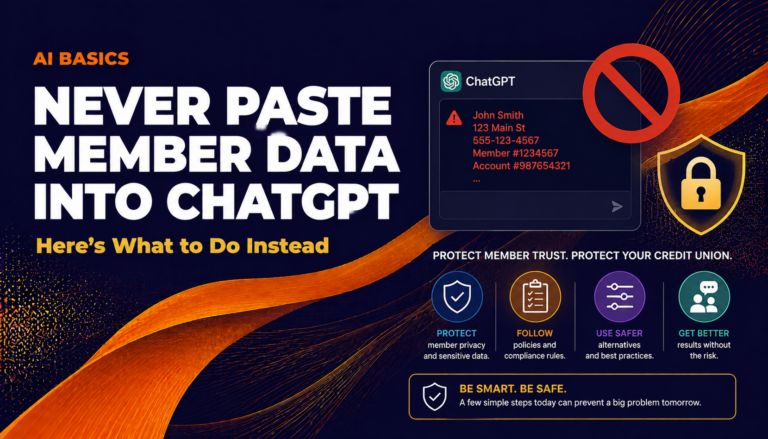
You’ve seen it happen. Someone on your loan ops team gets a great idea: paste a member’s application details into ChatGPT, ask it to summarize the risk profile, and get an answer in ten seconds. Fast, useful, done.
Except it’s not done. That data just left your building.
This isn’t a hypothetical scare story. It’s a pattern happening at credit unions right now, usually without any malicious intent. Staff discover that AI tools save them time, they start experimenting, and nobody told them where the line is. That’s a data governance problem—and as the executive, it lands on your desk.
What Actually Happens When You Paste Data Into ChatGPT
OpenAI’s consumer product—ChatGPT Free and Plus tiers—has historically used conversation data to improve its models. Settings have changed over time, and users can opt out, but “opt out if you remember to” is not a compliance posture.
More importantly, the moment member data leaves your network and enters a third-party system without a proper data processing agreement, you have a problem. That’s true whether or not the data ever gets used for training. NCUA examiners and your own data security policies care about where member data travels, not just what happens to it at the destination.
Member data includes more than most people expect: names, account numbers, loan amounts, income figures, and even the combination of a ZIP code and a credit score can constitute nonpublic personal information (NPPI) under Gramm-Leach-Bliley. Consult your compliance team before deciding what does or doesn’t qualify—the line moves depending on context.
The risk isn’t that ChatGPT is malicious. The risk is that you’ve shared member data with a third party under terms you probably haven’t read, without a signed agreement, and without your members’ knowledge.
What to Do Instead
The good news: you don’t have to choose between AI productivity and data safety. You have real options, and none of them require a technical background to understand.
Option 1: Use the Enterprise Version With a Data Processing Agreement
OpenAI offers ChatGPT Enterprise (verify current pricing and terms at openai.com). Anthropic offers similar enterprise tiers for Claude. Microsoft 365 Copilot sits inside your existing Microsoft tenant. These enterprise products typically include a data processing agreement, a contractual commitment that your data won’t be used for model training, and admin controls so you can manage what your team accesses.
Before signing anything, have your compliance and legal team review the agreement. “Enterprise” on the label doesn’t automatically make it compliant for your specific situation.
Option 2: Anonymize Before You Prompt
If your team wants to use a general AI tool for analysis or drafting, teach them to anonymize first. Replace the member’s name with “Member A.” Swap the account number for a placeholder. Strip the ZIP code if it isn’t relevant to the task. What’s left is usually enough for the AI to do useful work—summarizing a loan narrative, flagging inconsistencies, suggesting follow-up questions—without sending actual member data anywhere.
This takes thirty extra seconds and meaningfully reduces your exposure.
Option 3: Build a Private AI Environment
This is the longer-term play, and it’s more accessible than it sounds. Tools like Microsoft Azure OpenAI Service or a self-hosted model let you run AI inside a controlled environment. Your data doesn’t leave your infrastructure (or your vendor’s dedicated, contracted infrastructure).
Some credit unions are exploring RAG—Retrieval-Augmented Generation—a setup where the AI can search your internal documents without those documents being baked into a public model. Think of it as giving the AI access to your policy manuals and procedure guides, but only within your walls. We’ll cover RAG in depth in a separate post.
Option 4: Use AI for Work That Doesn’t Touch Member Data
A lot of AI value has nothing to do with member data. Your team can use general AI tools freely right now for tasks like these:
- Drafting board memos. Give the AI your bullet points; it writes the narrative. No member data required.
- Summarizing vendor proposals. Paste in the vendor’s own document—no NPPI there.
- Writing member-facing FAQs. The AI drafts, your team edits and approves. Clean.
- Preparing for examiner conversations. Use AI to anticipate questions and draft talking points from public regulatory guidance.
- Creating training materials. Policy summaries, quiz questions, onboarding scripts—all fair game.
Redirect staff AI energy toward these use cases while you build the infrastructure for safe member-data workflows. You get the productivity wins now without the compliance exposure.
How Do You Set a Policy Your Team Will Actually Follow?
A policy that lives in a SharePoint folder nobody visits isn’t a policy—it’s a document. Here’s a practical approach:
- Name the categories explicitly. Write down what counts as member data in plain language: names, account numbers, SSNs, loan amounts, income, balances, and combinations thereof. Don’t make staff guess.
- Create a short approved-tools list. One page. Which AI tools are approved for which use cases. If it’s not on the list, it’s not approved.
- Train with examples, not abstractions. Show your loan ops team a before-and-after: here’s what the original prompt looked like, here’s the anonymized version. Make it concrete.
- Build an easy escalation path. Staff will find edge cases. Give them a name to call or a channel to ask—not just a policy to reread.
- Review quarterly. AI tool terms of service are changing fast. What’s true today may shift in six months. Put it on the calendar.
Your compliance team should sign off on the final version. This framework is a starting point, not legal advice.
Why This Is an Executive-Level Issue
You might be tempted to hand this off to IT and move on. Resist that instinct.
AI adoption is happening on your team right now, whether you’ve sanctioned it or not. Many employees at most organizations have already used a general AI tool for work tasks. At credit unions, where trust is the product, a data incident tied to an unsanctioned AI tool doesn’t just create regulatory exposure—it creates a member trust problem that’s much harder to fix.
The executives who get ahead of this aren’t the ones who ban AI. They’re the ones who build a safe path to use it well.
What’s the Risk?
The data privacy risk here is real and specific. Consumer-tier ChatGPT—Free and Plus—was not designed with GLBA compliance in mind. Pasting NPPI into those products without a data processing agreement in place puts your credit union in a difficult position with examiners, and potentially with your members. If your team is already doing this, treat each instance as a potential data incident and loop in your compliance team now. That’s not alarmism; that’s your existing incident response policy doing its job.
The path to lower risk is clear: enterprise agreements, anonymization habits, or private AI environments for any workflow that touches member data. For everything else—board memos, vendor summaries, examiner prep, training content—the risk is low and you can move freely. The main thing to avoid is a blanket “AI is fine” culture where staff assume all tools are equivalent. They’re not. Draw the line clearly, train to it, and review it every quarter as the tools evolve.
Frequently Asked Questions
Is it ever okay to paste member data into ChatGPT?
Not without a proper data processing agreement in place and sign-off from your compliance team. The Free and Plus tiers of ChatGPT do not include the contractual protections a credit union needs under GLBA. ChatGPT Enterprise or comparable enterprise tools may be appropriate, but have legal review the specific agreement before you use it with member data.
What counts as member data under Gramm-Leach-Bliley?
Nonpublic personal information (NPPI) includes names, account numbers, SSNs, income figures, loan balances, and certain combinations of data—such as a ZIP code paired with a credit score. The definition is broader than most people expect, so ask your compliance team to define it clearly for your staff in plain language.
Does ChatGPT Enterprise make it safe to use member data?
Enterprise tiers typically include a data processing agreement and a commitment that data won't be used for model training, but the label alone isn't sufficient. Your compliance and legal team should review the specific agreement before you use any enterprise AI product with actual member data.
What AI tasks are safe to do right now without a special agreement?
Any task that doesn't involve member data: drafting board memos from your own bullet points, summarizing vendor proposals, writing member-facing FAQs, building training materials, and preparing examiner talking points from public regulatory guidance are all low-risk starting points.
What should I do if a staff member already pasted member data into ChatGPT?
Treat it as a potential data incident and follow your existing incident response procedures—involve your compliance team immediately. Document what data was shared, with which tool, and under what terms. Whether it rises to reportable status depends on your specific situation and your compliance team's assessment.
Want to Dig Deeper?
CU 2.0 works with credit union executive teams—at institutions of every size—to build practical AI programs that actually stick. Whether your team has never touched an AI tool or you're ready to stand up a private AI environment, we'll meet you where you are. We can help you build your approved-tools policy, set up enterprise agreements, or go deeper into workflows like RAG and Claude for internal knowledge. If you're ready to make AI adoption safe and productive, let's talk.
This post was drafted with AI assistance and reviewed by a human at CU 2.0. AI makes mistakes; verify any specific claim before acting on it.