Your Team Is Re-Explaining the Same Context Every Day, Isn't It?
Your loan ops manager opens Claude, types "you are a credit union compliance expert," pastes in your lending policy, and then finally asks the actual question. Every single session. Your member services team does the same thing with your fee schedule. Your marketing coordinator re-explains your brand voice from scratch every Monday morning.
That's not an AI problem. That's a setup problem. Claude Projects solves it—and you can have one running for your team in under an hour.
What Is a Claude Project?
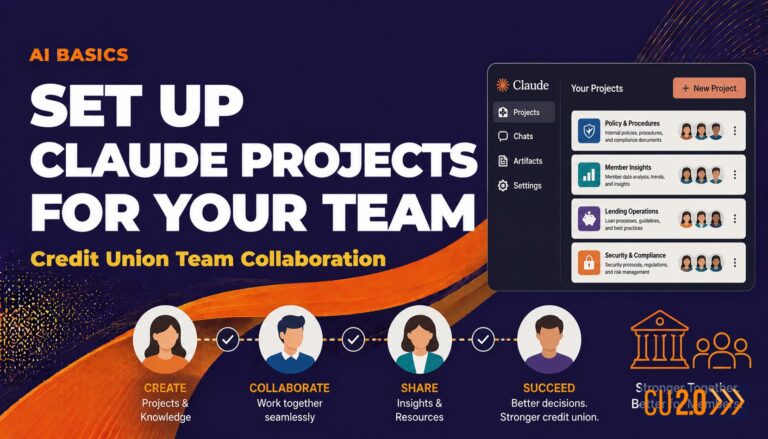
A Claude Project is a persistent workspace inside Claude where you store instructions, upload knowledge documents, and keep conversation history. Your team never has to re-explain who you are, what your policies say, or what tone to use.
Think of it as a version of Claude tuned specifically for a task at your credit union. You build it once. Your team uses it over and over. The context is already there waiting.
A Claude Project is the difference between hiring a temp every Monday and working with a sharp colleague who already knows your policies, your tone, and your members.
If you've read our post on building custom GPTs for credit unions, the concept maps directly. Both tools let you embed instructions and knowledge so your team starts every conversation ahead of the curve. Claude Projects lives inside Claude (Anthropic's platform); custom GPTs live inside ChatGPT (OpenAI's platform). The workflow is nearly identical. Pick the tool your team already uses—or run both.
Why Does This Matter for Credit Unions Specifically?
Credit unions carry more context than most organizations. You have state-specific regulations. You have a unique field of membership. You have board-approved policies your examiners expect staff to know cold. You have a member-first tone that generic AI responses don't naturally produce.
Every time a staff member opens a blank AI session, all of that context lives only in their head—or gets copy-pasted from a shared doc that may or may not be current.
A Claude Project bakes that context in. Your lending team gets a project that already knows your HELOC guidelines. Your marketing team gets one that already speaks your brand voice. Your exec team gets one that already knows how to frame things for a board audience.
How Do I Set Up a Claude Project for My Credit Union?
You'll need a Claude account with Projects access. As of 2025, Projects are available on Claude's paid plans (Pro and Team).
Here's the setup from start to finish:
-
Create a new project. From the Claude home screen, click "Projects" in the left sidebar, then "New Project." Give it a clear name—"Lending Policy Assistant" or "Board Memo Writer"—so your team knows exactly what it's for.
-
Write your project instructions. This is the most important step. Claude calls this the "Project Instructions" field. Write it like you're onboarding a sharp new employee who knows nothing about your credit union yet. Cover who you are, who your members are, what tone to use, and what this project should help with. A few sentences won't cut it—aim for a solid paragraph or two. For a lending project, something like: "You are a lending assistant for [Credit Union Name], a federally chartered credit union serving [field of membership]. You help loan officers draft member communications, summarize applications, and check responses against our written lending policies. Always use plain language. Always flag anything that may need compliance review before it goes to a member."
-
Upload your knowledge documents. Click "Add Content" inside the project. Upload the documents Claude should reference—your lending policy, fee schedule, brand voice guide, member FAQ. Claude reads PDFs, Word docs, and plain text files. Keep documents current; an outdated policy doc is worse than no doc at all. Consult your compliance team before uploading anything that contains member PII or sensitive exam materials.
-
Test it before you share it. Ask a few questions your team actually asks. See if Claude pulls from your documents correctly and whether the tone is right. Tweak your instructions if the answers are off. Most projects need one or two rounds of refinement before they're ready for the full team.
-
Share it with your team. On Claude's Team plan, you can share a project with other users in your organization. They'll see it in their sidebar and can open new conversations inside it. Each conversation is separate, but the instructions and knowledge documents are shared across all of them.
Claude Projects vs. Custom GPTs: Which Should You Use?
Both are solid tools. Here's the honest comparison as of 2025:
- Claude Projects tends to handle longer documents well and often produces more nuanced prose—useful for drafting board memos or analyzing vendor proposals.
- Custom GPTs (in ChatGPT) offer more third-party integrations and sit inside OpenAI's broader ecosystem.
- Team sharing works similarly on both platforms, though the interface differs.
- Pricing varies.
If your team already uses Claude day-to-day, start with Projects. If they're on ChatGPT, start with custom GPTs. The concepts transfer almost one-to-one, so time spent learning one makes the other easy.
Four Starting Points Worth Building First
Not sure what to build? These four projects tend to deliver immediate value for credit union teams:
Examiner prep assistant. Upload your recent exam findings, your policies, and your CAMELS context. Use it to draft responses to examiner questions or stress-test your policy language before the visit. Have your compliance team review any output before it goes anywhere official.
Board report writer. Feed it your board report template and a few past reports. Use it to turn raw data into clean executive summaries your board will actually read.
Member communication drafts. Upload your brand voice guide and product descriptions. Use it to draft member-facing emails, letters, and FAQs in your voice—not generic AI voice.
Vendor proposal summarizer. When you're comparing core conversion vendors or digital banking platforms, drop in the proposals and ask for a structured comparison against your stated priorities.
None of these replace human judgment. Your team should always review AI-generated output before it reaches a member, a board member, or an examiner. But they can dramatically reduce the time it takes to get to a solid first draft.
What Should You Keep Out of Your Projects?
Avoid uploading documents that contain member account data, Social Security numbers, or other personally identifiable information. Claude processes data through Anthropic's servers, and while Anthropic has enterprise data-handling commitments, your member data belongs in systems built for it—not in an AI workspace. When in doubt, consult your compliance and information security teams before uploading anything sensitive.
What's the Risk?
The risk profile here is low-to-moderate, and where it lands depends almost entirely on what you put inside the project. If you're uploading brand voice guides, policy summaries written for staff training, and product descriptions, you're in low-risk territory. Go build. The workflow is no riskier than a shared Google Doc.
The risk rises if you start uploading documents that contain member NPI—account numbers, SSNs, loan details. Claude is not a core system or a document management platform with your credit union's data security controls around it. Before uploading anything that could touch member data, talk to your compliance officer and your information security team. On the regulatory side, no examiner has flagged credit union teams for using AI drafting tools on internal workflows, but the space is moving fast—consult your compliance team if you plan to use project outputs in any official exam response or member-facing regulatory disclosure. For internal productivity and first-draft work, the risk is low. Go.
Frequently Asked Questions
What is a Claude Project?
A Claude Project is a persistent workspace inside Claude (Anthropic's AI platform) where you store custom instructions and upload knowledge documents. It lets your team start every AI conversation with the right context already in place—no more re-explaining your policies or tone from scratch.
How is a Claude Project different from a custom GPT?
They're the same concept on different platforms. Claude Projects live inside Claude (Anthropic); custom GPTs live inside ChatGPT (OpenAI). Both let you embed instructions and documents so AI responses are tailored to your organization, and the workflows are similar enough that learning one makes the other easy.
Do I need a paid Claude plan to use Projects?
Yes, as of 2025, Claude Projects are available on paid plans (Pro and Team). The Team plan allows you to share projects with colleagues.
Can I upload our credit union's policies and procedures to a Claude Project?
Yes—policy documents, brand guides, templates, and product descriptions are all fair game and among the most valuable things you can upload. However, avoid uploading documents with member PII or sensitive exam materials, and consult your compliance and information security teams before uploading anything you're unsure about.
Will Claude Projects give my team accurate compliance advice?
No AI tool should be treated as a definitive compliance authority. Claude Projects can help your team draft language and work faster, but any output touching regulatory, legal, or compliance matters should be reviewed by your compliance team before it goes anywhere official.
Want to Dig Deeper?
CU 2.0 works with credit union executive teams—at institutions of all sizes—to build real AI capability, not just awareness. Whether your team has barely opened Claude or is ready to automate entire workflows, we'll meet you where you are and help you move faster. We've guided CU leaders through everything from Claude Projects and custom GPTs to full workflow automation with Claude Code and n8n. Ready to put a plan in place? Book a call with the CU 2.0 AI coaching team at the link below.